How to Track Amazon Affiliate Earnings Across Multiple Websites ?
When I started working on another website, I ran into a surprisingly simple question:
Do I need another Amazon Associates account?
At first, it seemed logical.
One website has one affiliate account.
Another website has another account.
Simple, right?
Well… not exactly.
Once I started looking into Amazon Associates’ current rules and the difference between an Associates account, a website, a Store ID, and a Tracking ID, I realized that I had been thinking about the whole setup the wrong way.
And if you’re building more than one website, there’s a good chance you’ve wondered about the same thing.
Do you need another Amazon Associates account?
How do you tell which website generated a sale?
Can you separate the earnings from different sites?
And perhaps most importantly:
How do you keep your Amazon affiliate reporting from turning into a complete mess?
The good news is that the basic idea is much simpler than it first appears.
First: Don’t Create Another Amazon Associates Account Just Because You Have Another Website
Let’s get the slightly uncomfortable part out of the way first.
Amazon’s current Associates guidance says that, unless Amazon has provided prior written consent, participation in the Program is limited to one Program account per category. Amazon also says it may terminate one or all accounts if it determines that multiple accounts within the same category are owned, operated, or controlled by the same person or entity.
So if you already have an Amazon Associates account and you’ve launched another website, don’t automatically assume you should go and create another account.
That’s the first thing I wish I’d understood earlier.
The better question is:
How should I add and track another website within my existing Amazon Associates setup?
That’s where Tracking IDs come in.
And this is where things start making a lot more sense.
So, What Exactly Is a Tracking ID?
Think of a Tracking ID as a little label attached to your affiliate traffic.
It helps you answer questions like:
- Which website sent this traffic?
- Which marketing channel is performing better?
- Is my newsletter actually generating clicks?
- Is one site producing more sales than another?
- Which traffic source deserves more of my attention?
Amazon specifically describes Tracking IDs as a way for Associates to analyze the performance of different websites or merchandising strategies while accumulating earnings under a single Associates ID.
That’s an important distinction.
A Tracking ID is not another Amazon Associates account.
It doesn’t create another separate affiliate relationship.
It stays associated with your main Associates ID.
In other words:
One Associates account
↓
Multiple Tracking IDs
↓
Separate performance data
That’s the basic idea.
Here’s a Simple Example
Let’s say you have two websites.
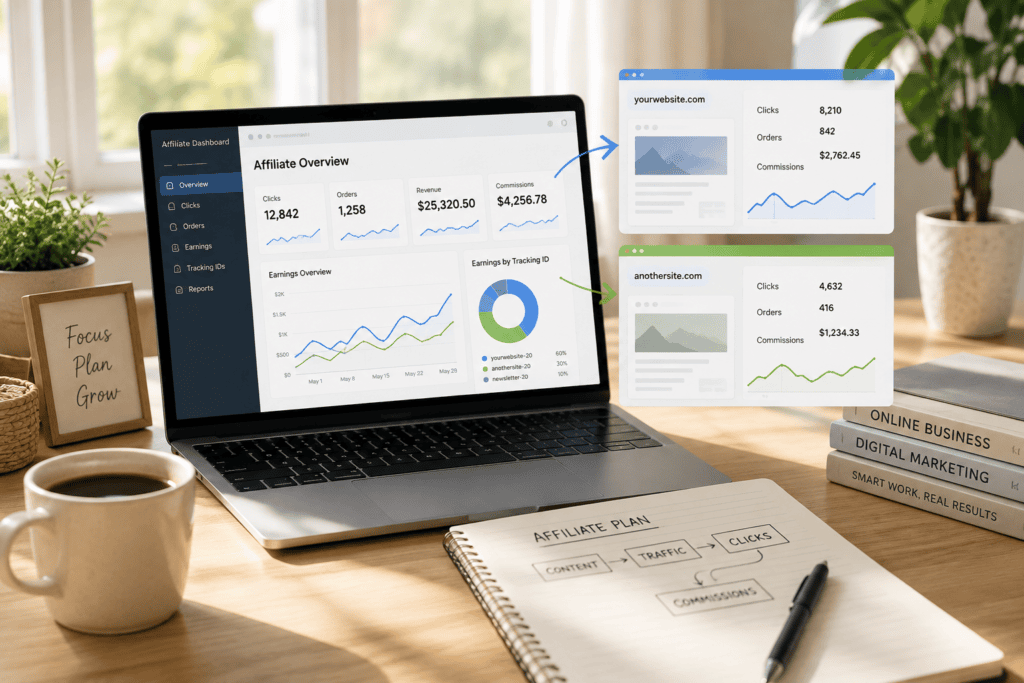
Your first website is: yourwebsite.com
Your second website is: anothersite.com
You could use a Tracking ID for the first site such as: yourwebsite-20
And another for the second: anothersite-20
These are just examples. Your actual IDs will depend on your Amazon Associates account.
Now imagine that both sites send visitors to Amazon.
Instead of looking at one giant pile of affiliate data, you can use the Tracking IDs to understand where that traffic came from.
Something like this:
| Website | Example Tracking ID | What It Helps You Track |
|---|---|---|
| yourwebsite.com | yourwebsite-20 | Affiliate activity from your first site |
| anothersite.com | anothersite-20 | Affiliate activity from your second site |
The earnings still accumulate under your Associates account.
But you can look at the Tracking ID data separately.
Amazon says Associates can view earnings for all Tracking IDs together or generate reports for individual Tracking IDs.
And honestly, that’s much more useful than simply knowing: “I made $X from Amazon this month.”
You eventually want to know: Where did that $X come from?
Your Website List and Your Tracking IDs Are Not the Same Thing
This was another part that took me a minute to understand.
There are two different things happening here.
Your website information tells Amazon where you’re participating in the program.
Your Tracking IDs help you analyze where your affiliate traffic and performance are coming from.
They’re related, but they’re not the same thing.
A simple way to think about it is:
Website information = Where am I promoting?
Tracking ID = Which source produced the results?
That’s why you shouldn’t think of a Tracking ID as something that automatically “belongs” to a website in a technical sense.
Instead, you decide how you want to use your Tracking IDs and then consistently use the appropriate one when creating affiliate links.
Amazon’s own documentation specifically says Tracking IDs can be used to analyze different websites or merchandising strategies.
That distinction becomes especially useful once your affiliate business gets a little bigger.
You Can Track More Than Just Different Websites
This is where Tracking IDs get more interesting.
Let’s say you only have one website: yourwebsite.com
You could still have different reasons for wanting to separate your affiliate traffic.
For example:
| Traffic Source | Example Tracking ID |
|---|---|
| Main website | yourwebsite-main-20 |
| Email newsletter | yourwebsite-email-20 |
| Social campaign | yourwebsite-social-20 |
| Another website | anothersite-20 |
Again, these are only examples of a naming system.
You don’t need to use these exact formats.
The point is that Tracking IDs don’t have to be limited to “Website A” and “Website B.”
Amazon itself gives an example of using one Tracking ID for a website and another for a newsletter, with both generating earnings for the same Associates account.
This can become incredibly useful when you’re trying to figure out what is actually working.
Because eventually, you don’t just want to make money.
You want to understand why you’re making money.
Why This Matters More Than You Might Think
When your site is tiny and you’re getting three clicks a week, you probably don’t care.
I certainly wouldn’t spend an afternoon building a complicated tracking system for three clicks.
But imagine you have:
- Two websites
- A newsletter
- Social media traffic
- Product reviews
- Buying guides
- Several different types of affiliate content
Suddenly, one big Amazon report isn’t quite as helpful.
You might see that you earned $150.
Great.
But what if:
- $120 came from one website
- $20 came from another
- $10 came from your newsletter
That’s a very different picture.
Maybe your second website isn’t worth spending more time on.
Maybe your newsletter is surprisingly effective.
Maybe one type of content consistently brings in better-performing traffic.
Without separate tracking, you might never notice.
That’s why I think of Tracking IDs less as an “Amazon technical thing” and more as a decision-making tool.
How to Create a New Amazon Tracking ID
Amazon currently provides Tracking IDs through Associates Central.
According to Amazon’s official help documentation, you can create multiple Tracking IDs by going to your account and selecting Manage your Tracking ID. Amazon’s documentation also says that Tracking IDs can be reviewed through the Tracking ID Summary Report.
The basic process is:
1. Sign in to Amazon Associates Central
Use your existing Associates account.
Don’t start by creating another account simply because you’ve launched another website.
2. Find “Manage Your Tracking IDs”
This is where Amazon lets you create and manage your Tracking IDs.
3. Create a name that you’ll understand later
This part sounds trivial.
It isn’t.
If you create several IDs with random names six months from now, you may have no idea what they were created for.
I’d keep the naming simple and descriptive.
For example:
yourwebsite-20
anothersite-20
yourwebsite-email-20
The exact format available to you may vary, so use whatever Amazon allows within your account.
4. Use the appropriate Tracking ID when building your affiliate links
This is the part that actually matters.
If you’re creating links for one website, use the Tracking ID you’ve designated for that website.
If you’re creating links for another site, use the corresponding Tracking ID.
Consistency is what makes the reporting useful.
Be Careful With SiteStripe
If you’re using Amazon’s SiteStripe to create affiliate links, pay attention to which Associate ID and Tracking ID you’re using.
Amazon’s current SiteStripe documentation says that your Associate ID and Tracking ID are included when generating a short link, and you can also specify the Associate ID and Tracking ID you want to use.
And here’s the annoying part.
The link can still look perfectly normal if you’ve selected the wrong Tracking ID.
The Amazon page opens.
The customer can shop.
The affiliate link may function normally.
But your reporting can end up in the wrong bucket.
That’s exactly the kind of tiny mistake that’s easy to make when you’re managing multiple websites.
And it’s also exactly the kind of mistake that’s irritating to discover three months later when you’re trying to figure out which site is actually performing.
So before publishing a new affiliate link, especially on a different website, take a second to check the Tracking ID.
That two-second habit can save you a lot of confusion later.
What If You Have Lots of Affiliate Links?
If you only have a handful of affiliate links, manually managing them may be perfectly reasonable.
You don’t necessarily need another tool just because you have an affiliate website.
But once you have dozens or hundreds of links, things get different.
You may eventually want an affiliate link management system that makes it easier to:
- update links
- organize affiliate URLs
- maintain consistent Tracking IDs
- manage links across lots of articles
There are WordPress tools that can help with affiliate link management, but I’d treat those as an optional layer—not something you need on day one.
The important part isn’t the plugin.
It’s understanding how Amazon’s Tracking IDs work first.
A plugin can’t fix a tracking structure you haven’t thought through.
Don’t Create a New Tracking ID for Everything
There’s another mistake that’s easy to make once you realize how useful Tracking IDs can be.
You start thinking: “Maybe I should create one for every article.”
Then one for every category.
Then one for every social platform.
Then one for every campaign.
Then one for every product.
And suddenly you have a small army of Tracking IDs and no idea what half of them are doing.
You don’t need that.
Amazon currently says an Associates account can have up to 100 Tracking IDs. If you need more, Amazon advises contacting Associates Customer Service.
But just because you can create 100 doesn’t mean you should.
I’d use a much simpler rule:
Create a new Tracking ID when you have a clear reason to compare the results.
If separating two traffic sources won’t change anything about your decisions, you probably don’t need separate IDs.
Keep your system simple enough that you can understand it at a glance.
A Simple Tracking System I’d Use
If I were starting with two websites today, I’d probably keep things very boring.
And I mean that as a compliment.
Something like:
| Purpose | Example |
|---|---|
| Main website | yourwebsite-20 |
| Second website | anothersite-20 |
| Newsletter | yourwebsite-email-20 |
| Social campaign | yourwebsite-social-20 |
That’s it.
No elaborate naming convention.
No spreadsheet with 47 tabs.
No complicated system that requires a tutorial every time you want to add a link.
You want to be able to look at a Tracking ID and immediately know what it represents.
That’s the whole point.
How Do You Actually Read the Data?
Once you have multiple Tracking IDs, you can use Amazon’s reporting tools to compare performance.
Amazon says the Tracking ID Summary Report can show performance for individual Tracking IDs, and its reporting tools allow you to view data for a single Tracking ID or for all Tracking IDs.
Depending on the report, you may be able to look at things such as:
- Clicks
- Ordered items
- Shipped items
- Revenue
- Referral commissions
- Earnings
Amazon’s documentation describes Tracking ID Summary Reports as providing performance information for individual Tracking IDs, including clicks, items ordered, items dispatched, revenue, referral commissions, and total earnings.
This is where the numbers become useful.
Let’s say you have two websites.
After a few months, you discover:
Website A
Lots of clicks, relatively few purchases.
Website B
Fewer clicks, but a much higher number of purchases.
That tells you something.
Maybe Website B’s audience has stronger buying intent.
Maybe its content is better aligned with the products you’re recommending.
Maybe the articles are attracting fewer people but the right people.
Without tracking the sites separately, you could easily miss that.
Don’t Judge a Website by Clicks Alone
There’s one more thing I’d keep in mind.
More clicks don’t automatically mean more money.
A website getting 1,000 affiliate clicks isn’t necessarily doing better than one getting 300 clicks.
What matters is what happens after those clicks.
That’s why I wouldn’t look at only one metric.
I’d pay attention to the bigger picture: Traffic → Clicks → Orders → Revenue → Commissions
You don’t need to become a data analyst.
You just need enough information to answer useful questions.
For example:
Which website sends the most qualified traffic?
Which content gets people to click?
Which site produces actual purchases?
Which channel is worth spending more time on?
That’s where affiliate reporting starts becoming genuinely useful.
What I Wouldn’t Do
If you’re managing multiple websites, here are a few things I’d avoid.
Don’t create another Associates account just because you launched another website.
First check Amazon’s current policies and determine whether your existing setup can accommodate the new site. Amazon’s current guidance specifically addresses participants with more than one website.
Don’t assume a Tracking ID is another account.
It isn’t.
Amazon explicitly says Tracking IDs remain associated with your main Associates ID and do not constitute separate accounts.
Don’t create dozens of Tracking IDs without a reason.
More data isn’t automatically better data.
Sometimes it’s just more clutter.
Don’t forget which Tracking ID you’re using.
Especially if you manage more than one website.
And don’t rely on an old tutorial forever.
Amazon’s dashboard, tools, and policies can change.
If something in your Associates Central account doesn’t match an article you read two years ago, I’d trust the current Amazon documentation over the old tutorial.
One More Important Point: Keep Your Website Information Current
If you’re adding another website to your affiliate business, don’t think of Tracking IDs as a substitute for properly handling your website information with Amazon.
Amazon has a specific help section for Managing Multiple Websites, including guidance on enrolling websites and adding or removing sites from your Website List.
So I’d treat these as two separate tasks:
1. Make sure Amazon knows about the websites you’re using for the program.
2. Use Tracking IDs to organize and analyze the traffic you’re sending.
One is about your participation and account information.
The other is about tracking performance.
Keeping those two ideas separate makes the whole system much easier to understand.
What About Mobile Apps and Store IDs?
If you eventually expand beyond websites into mobile apps, don’t assume everything works exactly the same way.
Amazon has separate guidance for mobile applications and says approved mobile apps can be tracked separately from web properties using a separate Store ID, with Tracking IDs underneath that Store ID.
That’s a slightly different situation from simply running two websites.
So if you’re dealing with mobile apps, I’d check Amazon’s current mobile-specific requirements rather than assuming the website setup applies.
This is one of those situations where five minutes reading the official documentation can save you from making a much bigger mess later.
The Simple Way to Think About All of This
If the terminology is still making your head spin, forget the terminology for a second.
Think about it like this.
Your Associates Account
That’s the main relationship with Amazon.
Your Websites
Those are the places where you’re publishing your content and using your affiliate links.
Your Tracking IDs
Those are labels that help you understand where your affiliate activity is coming from.
And your reporting lets you look at the results.
That’s really the heart of it.
You don’t need to turn your affiliate business into a complicated accounting project.
You just need enough structure to answer:
Where is my traffic coming from, and what’s actually working?
Final Thoughts
When I first started looking into how to manage Amazon affiliate links across more than one website, I thought the answer was going to be complicated.
It wasn’t.
The confusing part was the terminology.
Once I stopped thinking of Tracking IDs as separate affiliate accounts and started thinking of them as labels for different sources of traffic, the whole thing became much easier to understand.
And that’s probably the simplest way I can put it:
Your Associates account manages the relationship. Tracking IDs help you understand the traffic.
If you have two websites, you may want to use separate Tracking IDs so you can see how each site performs.
If you have one website but several important traffic sources, Tracking IDs can also help you compare those.
And if you’re just getting started?
Don’t overthink it.
You don’t need 20 Tracking IDs, a complicated spreadsheet, and a sophisticated reporting system on day one.
Start with a simple structure.
Give each important traffic source a clear label.
Use the right Tracking ID when creating your links.
Then let the data accumulate for a while.
Because eventually, the most useful question isn’t simply: “How much did I make from Amazon?”
It’s: “What am I doing that is actually working?”
And that’s the kind of question that can help you build a much smarter affiliate business.
A quick note before you make changes
Amazon Associates policies, program requirements, reporting features, and dashboard interfaces can change. This article is intended as practical educational information, not legal or compliance advice. Before creating or changing your account structure, check the current Amazon Associates Program policies and official help documentation for your specific program and marketplace. Amazon’s current guidance on multiple websites and Tracking IDs should be treated as the final authority.
Want to learn more about Amazon Associates?
Visit the official Amazon Associates website to review the latest program requirements, policies, and tools.
You might also like to know:
Beginner Guides
- What Is Affiliate Marketing? A Beginner’s Guide
- How to Choose the Right Platform for Your Affiliate Marketing Journey ?
- How to Choose Affiliate Products That Actually Sell ?
- Does Ahrefs Have an Affiliate Program in 2026?
- Surfer SEO Affiliate Program: How It Works, Commission Rates & Who It’s For
- How to Become an Affiliate Marketer in 2026: A Step-by-Step Guide
- How to Start Affiliate Marketing With No Audience
- Starting Affiliate Marketing From Scratch: What I’d Do Differently
A Note From SmileGrows
Is this financial advice?
No. The content on SmileGrows is intended for general educational and informational purposes only. It does not constitute financial, investment, tax, legal, or other professional advice.
How accurate is the information?
I do my best to research and verify the information I share, but mistakes, outdated information, missing context, or incorrect interpretations can happen. When discussing financial figures or company developments, please refer to the original sources for the most current information.
What if I find an error?
Please let me know! I genuinely welcome corrections, suggestions, and thoughtful feedback. If you spot an error, outdated information, or an incorrect attribution, I’d be happy to review it and make corrections when appropriate.
Can I make financial decisions based on these articles?
Nothing on SmileGrows constitutes financial, investment, tax, legal, or other professional advice. Please do your own research and consult a qualified professional when making financial decisions. When discussing companies, financial figures, or other factual claims, please refer to the original sources for the most authoritative and up-to-date information.