How to Do Keyword Research for a Blog: A Beginner-Friendly Guide
When I first started learning SEO, I assumed keyword research just meant finding a term with a huge search volume and dropping it into an article a few times. It turns out to be a lot more interesting than that, and honestly a lot more useful once you understand it properly.
If you’re figuring out how to do keyword research for a blog, the real question isn’t “what keyword has the most searches?” It’s “what is this person actually trying to accomplish when they type this into Google?”
That distinction is the difference between writing for an algorithm and writing for an actual human being, and when you’re building a new blog with limited time, that difference matters a lot.
What I Actually Got Wrong at First: My early SmileGrows drafts were stuffed with keywords I’d copied straight out of a free keyword tool, without stopping to check whether the intent behind them actually matched what I was writing. A couple of those articles ranked for almost nothing, because the searcher wanted something completely different from what I’d handed them. Fixing that meant going back and rewriting, not just sprinkling in more keywords.

1. What a Keyword Actually Is
A keyword is simply something someone types into a search engine, “how to start a blog,” “how much does it cost to start a blog,” or “best budget planner.” Some are short and broad. Others are long and oddly specific.
For a new blog, those specific, longer searches are often the most interesting, because the person searching usually knows exactly what problem they’re trying to solve.
2. Start With a Question, Not a Tool
Before opening any SEO software, I write down questions my audience might actually ask.
If your blog is about blogging itself, that list might include:
- How do I start a blog?
- How much does a blog cost?
- What should I blog about?
- How do bloggers make money?
- How do I get traffic?
- How do I find keywords?
Notice that these questions basically become article ideas on their own, that’s a far better starting point than staring at a giant, overwhelming keyword spreadsheet.
3. Think Like the Person Searching, Not the Person Writing
Take “best blogging platform.” What does that person actually want?
Probably a comparison, WordPress versus Wix, pricing, ease of use, pros and cons. Now compare that to “how to start a blog,” where the person almost certainly wants a step-by-step guide covering hosting, domains, WordPress, and setup.
Same general subject, completely different intent. Your article needs to match what the searcher actually wants, not just what the keyword technically contains.
4. Intent Matters More Than Volume
Imagine finding a keyword with 100,000 monthly searches. Sounds fantastic on paper. But if the search intent doesn’t line up with what your site actually offers, that traffic isn’t worth much to you.
Now imagine a keyword with only 1,000 monthly searches, where nearly everyone searching it is exactly your target reader, that smaller number can be far more valuable.
This is exactly why I don’t recommend chasing volume blindly, especially early on when you don’t have the authority to compete for the biggest terms anyway.
5. Use Google Itself as a Free Research Tool
You can learn a surprising amount without paying for anything. Search your topic and look at the autocomplete suggestions, the “people also ask” box, related searches at the bottom of the page, and the patterns in existing result titles.
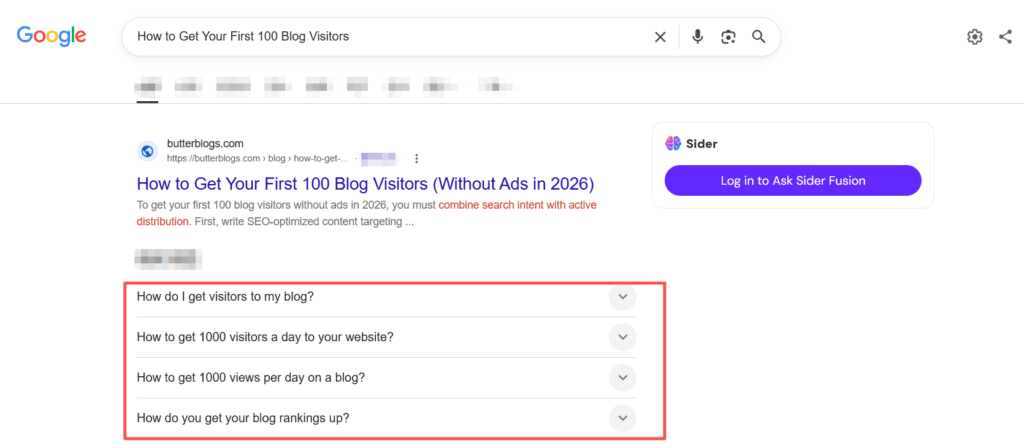
I collect these in a simple spreadsheet with three columns — the keyword, the intent behind it, and a possible article idea. Something like “how to start a blog” paired with informational intent and a step-by-step guide, or “Hostinger review” paired with commercial intent and an actual review.
At that point you’re not just gathering keywords anymore, you’re building a real content plan.
6. Study What’s Already Ranking
Before writing anything, I search the keyword and actually look at what’s sitting on page one. Are the top results tutorials, list posts, reviews, comparisons, product pages, forums, or videos? That tells you a lot about what Google — and by extension, real searchers — expect from that query.
If the top results are all in-depth tutorials, publishing a short opinion piece probably isn’t going to compete well.
7. Don’t Try to Out-Muscle Giant Sites on Everything
When you’re new, searching a keyword and seeing Forbes, HubSpot, NerdWallet, and Wikipedia sitting at the top can feel discouraging, like there’s simply no room left.
Don’t let that stop you. Look for more specific angles instead. Rather than targeting “how to make money,” you might target “how to make money blogging as a beginner.” The second version gives you a much clearer, more winnable audience, which is exactly why long-tail keywords tend to work better for newer sites.
8. Build Topic Clusters, Not Isolated Keywords
Instead of treating keywords as scattered individual words, think in groups.
Under a main topic like “how to start a blog,” you can build out supporting pieces covering startup costs, choosing a niche, choosing a domain, choosing hosting, WordPress setup, keyword research, getting traffic, and monetization. That’s a cluster, and it’s exactly how the first several SmileGrows Blogging articles are structured, which also makes internal linking between them far more natural.

Affiliate Marketing Content Cluster
9. Build a Keyword Map So You’re Not Repeating Yourself
One common beginner mistake is targeting the same keyword across five different articles, which just leaves them competing with each other.
Instead, I map one primary keyword to one article, the start-a-blog guide gets “how to start a blog,” the cost guide gets “how much does it cost to start a blog,” the hosting review gets “Hostinger review for beginners,” and so on.
Each piece gets a clear, singular job to do, which keeps the whole site much cleaner.
10. Don’t Stuff the Keyword Into Every Sentence
I had to unlearn this one myself.
You don’t need to write something like “if you’re wondering how to do keyword research for a blog, this how-to-do-keyword-research-for-a-blog guide will show you how to do keyword research for a blog.” Nobody wants to read that, and it doesn’t actually help your rankings the way people used to think it did.
Use the main keyword naturally, write for an actual human, and let related concepts show up throughout the piece the way they naturally would in a genuine explanation.
11. Keywords Should Guide Your Content, Not Dictate It
This distinction matters. A keyword tells you what people are looking for, it doesn’t tell you everything you need to say about it.
Your real job is providing the best, most useful answer you’re capable of, which might mean including definitions, examples, common mistakes, tool recommendations, screenshots, and your own actual experience.
Instead of just writing “use Google Search Console,” you can show it directly: your actual Google Search Console dashboard.
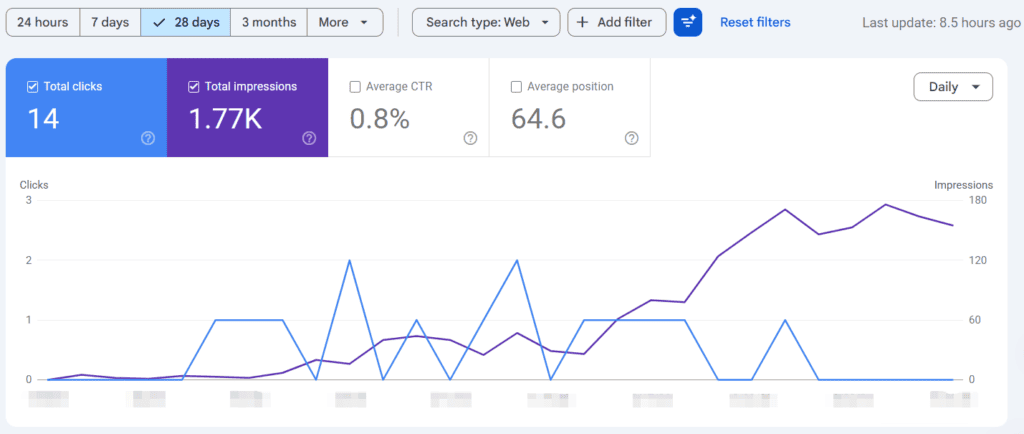
Early data from the smilegrows site
And then explain it in your own voice, “this is roughly what I’m seeing in my own Search Console right now; yours will obviously look different if your site is newer.”
That’s far more useful than a generic instruction, and it’s exactly the kind of detail that makes an article feel like it was written by someone who’s actually done the thing.
12. Do You Really Need a Paid Keyword Tool?
Not necessarily, especially at the beginning.
Paid platforms are genuinely useful once you’re doing high-volume research, but a beginner can learn a lot from Google search itself, Google Search Console, Google Trends, a plain spreadsheet, and the questions your own audience is already asking.
A hundred-dollar-a-month keyword tool can’t tell you what your specific audience actually needs better than paying attention can.
13. What I’m Actually Doing With SmileGrows
I’ve folded keyword research directly into the content planning process rather than treating it as a separate task that happens before “the real work.”
The rough sequence is audience problem, then search query, then search intent, then a look at what’s already ranking, then an article idea, then the actual content, then internal links, then traffic, then ongoing updates based on what Search Console shows me over time.
That loop matters more to me than collecting a huge spreadsheet of keywords ever did, because a spreadsheet full of keywords isn’t a website. Content is what actually turns research into something real.
14. A Simple Workflow If You’re Starting From Zero
Pick a broad topic, write down ten questions your audience might realistically ask, search those questions on Google, study the autocomplete and related searches, look closely at what’s currently ranking, identify the intent behind the query, settle on one primary keyword, write the best article you’re capable of around it, link it to related pieces, and then watch what Search Console tells you afterward.
Then do it again with the next topic.
15. Don’t Let Research Turn Into Procrastination
This might be my favorite piece of advice in this whole guide. You can spend weeks researching keywords, building enormous spreadsheets, comparing search volume, and analyzing competitors, and never actually publish a single article.
Research only pays off when it eventually leads to action.
So give yourself a limit: research, choose, write, publish, learn, and repeat. That loop, done consistently, matters more than any tool you could buy.