15 Best Affiliate Marketing Tools in 2026 (What You Actually Need)
If you’re getting into affiliate marketing, there’s an easy way to spend money before you make any.
Buy tools.
One person recommends an SEO platform.
Someone else says you need an email funnel.
Then you discover an affiliate link manager, a content optimization tool, an analytics platform, a design subscription…
Before you’ve published enough content to know whether your idea works, you’ve somehow built a monthly software bill.
I’ve been thinking about this a lot while building my own content and affiliate business.
And I’ve come to a pretty simple conclusion: The tools aren’t the business. They’re there to help you do the work.
So I don’t think you need the perfect affiliate marketing stack from day one. You need a few reliable tools that solve the problems you’re actually facing.
As your website grows, those problems change.
At first, you need somewhere to publish. Then you need to understand search. Then you need to improve your content. Then you have dozens of affiliate links to manage. Then you start wondering why people are leaving your pages. That’s when additional tools start making sense.
So rather than giving you another giant list of software you “must have,” I’ve put together 15 affiliate marketing tools worth knowing in 2026, and, perhaps more importantly, when I think you actually need them.
The 15 Affiliate Marketing Tools at a Glance
| Tool | What it helps with | When I’d consider it |
|---|---|---|
| Semrush | SEO & competitor research | Growing |
| Rank Math | On-page SEO | Starting |
| Surfer | Content optimization & AI visibility | Growing |
| Link Whisper | Internal linking | Growing |
| Google Search Console | Search performance | Starting |
| Google Analytics 4 | Traffic & conversions | Starting |
| Microsoft Clarity | User behavior | Growing |
| ThirstyAffiliates | Affiliate link management | Growing |
| Kit | Email marketing | Growing |
| Canva | Visual content | Starting |
| Google Workspace | Writing & organization | Starting |
| Awin / Impact / CJ Affiliate | Finding affiliate programs | Starting |
| Hostinger | Website hosting | Starting |
| Wordfence | WordPress security | Starting |
| Journey by Mediavine | Display advertising for growing sites | Later |
Let’s look at them one by one.
1. Semrush — SEO & Competitor Research
One of the first questions you’ll eventually ask as an affiliate marketer is:
What should I write about next?
That’s where an SEO platform like Semrush can become extremely useful.
Semrush brings together keyword research, competitor analysis, site auditing, rank tracking, and broader search visibility tools. Its current product positioning also includes AI visibility, reflecting how much search has changed over the past few years.
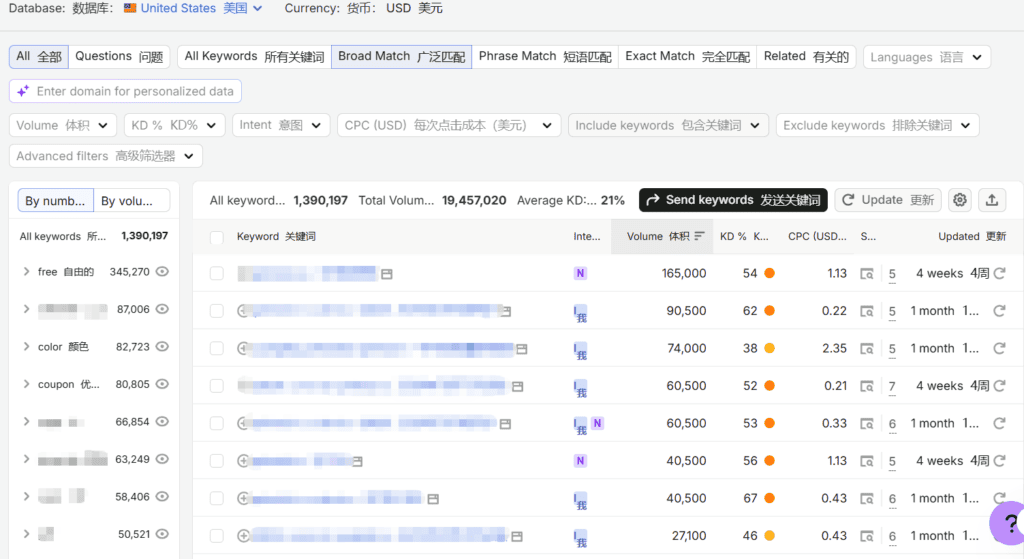
For example, instead of simply deciding that “affiliate marketing” sounds like a good topic, you can look at related searches, competing pages, keyword opportunities, and the websites already ranking.
That changes the question from:
“What do I feel like writing about?”
to:
“What are people already looking for, and where might I actually be able to compete?”
That’s a much better starting point.
Do you need Semrush immediately?
Probably not.
If you’ve published five articles, you don’t necessarily need another expensive dashboard telling you that you should publish more articles.
Google Search Console and Google’s own search results can teach you a surprising amount when you’re starting out.
I’d consider a paid SEO platform when your site has enough content for keyword research and competitor analysis to become part of your regular workflow.
What about the Semrush affiliate program?
Semrush currently runs its affiliate program through Impact. Its official information states that the program uses last-click attribution with a 120-day cookie window. Commission amounts vary depending on the product and partner tier.
That’s useful information if you’re considering Semrush as an affiliate product yourself.
But I wouldn’t recommend promoting an SEO tool simply because its affiliate program pays well.
If your audience doesn’t need it, the commission doesn’t matter.
My take: Excellent for growing content sites. Probably unnecessary for your first handful of articles.
2. Rank Math / Yoast SEO / SEOPress — On-Page SEO
If Semrush helps you figure out what to write, an SEO plugin helps you make sure the article is properly set up once you’ve written it.
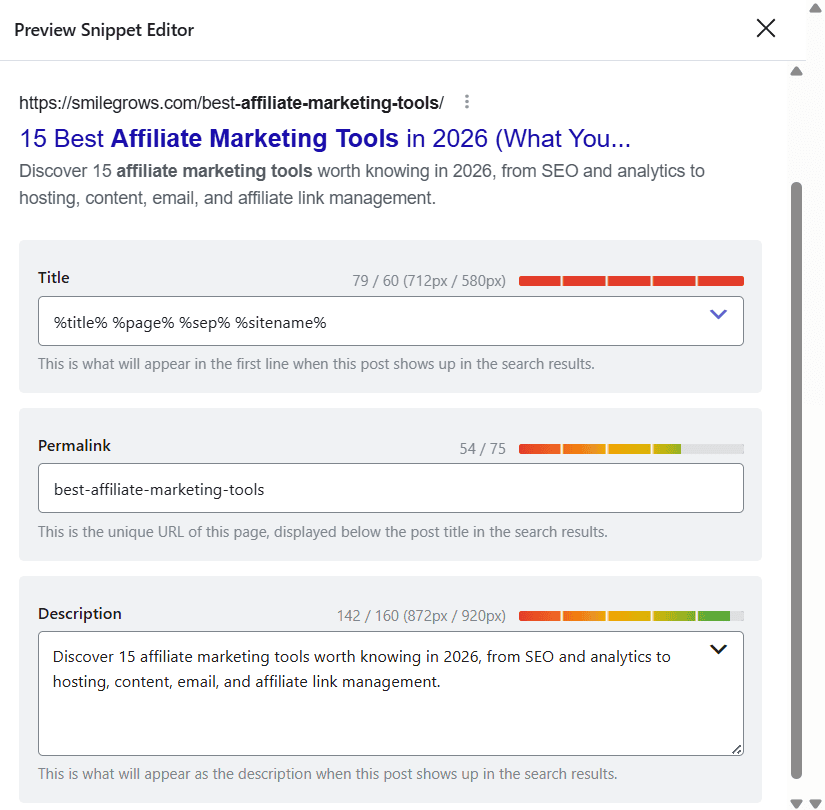
Rank Math can help with things such as:
- SEO titles and meta descriptions
- XML sitemaps
- schema markup
- redirects
- on-page SEO checks
- internal linking suggestions
Here’s what Rank Math looks like while I’m writing a blog post:
There are other good options, including Yoast SEO and SEOPress.
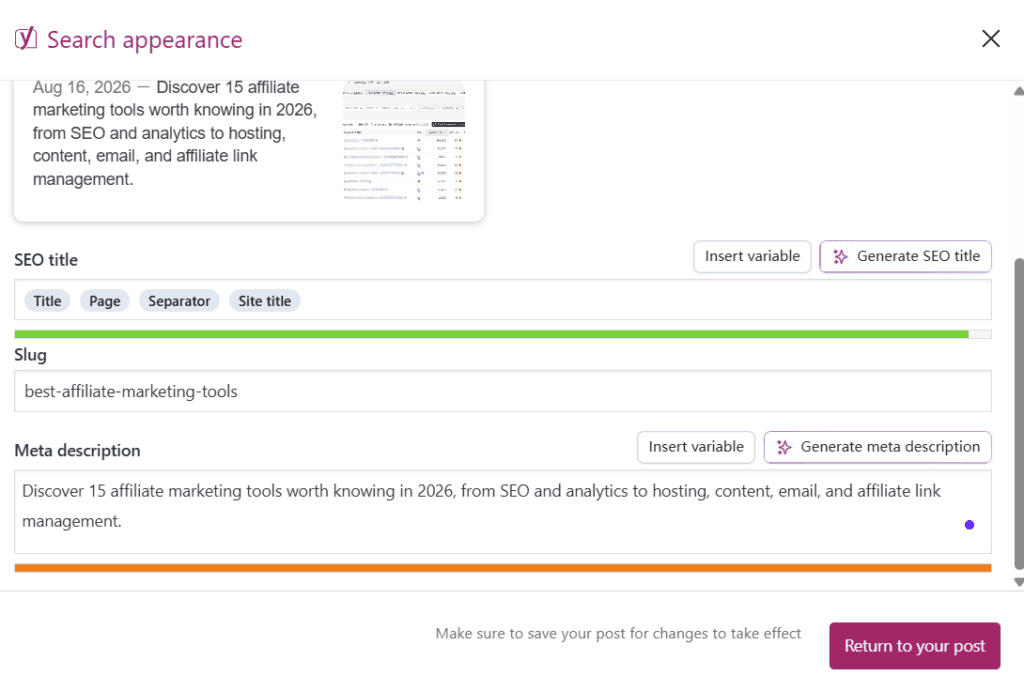
I’ve tried different SEO plugins on various websites, learning about their differences and features, and I might share those differences with you later. This is the Yoast SEO interface I used while writing this blog post (please note that it’s best to use only one SEO tool per site at a time to avoid duplicate or unnecessary data) :
Honestly, I wouldn’t spend months researching which SEO plugin is “the best.”
Pick one. Set it up properly. Learn the basics. Then go write.
The difference between publishing 50 useful articles and publishing 10 articles because you spent too much time comparing plugins is much bigger than the difference between most reputable SEO plugins.
My take: One of the basic tools I’d set up early.
3. Surfer — Content Optimization & AI Visibility
Surfer is particularly interesting in 2026 because the product has evolved beyond the old idea of simply optimizing an article around one keyword.
Its current platform includes content optimization, content creation, and AI-search visibility features.
The way I think about Surfer is pretty simple: It should help improve your thinking, not replace it.
I wouldn’t open a content optimization tool before I know what I want to say.
Instead, I’d use it after building a solid outline and writing a useful first draft.
It can help you identify areas where your article may need better topical coverage or where competing content is doing something your article hasn’t addressed.
That’s especially helpful for long-form affiliate articles.
Because it’s surprisingly easy to write 2,000 words and still fail to answer the questions a reader actually has.
One important note if you’re interested in the affiliate program
You’ll still find older articles online saying that Surfer pays 25% recurring commissions.
Be careful with those.
Surfer’s current affiliate program uses a tiered CPA structure. The official program lists:
- Starter: 75% CPA on monthly subscriptions, 15% on the first annual subscription
- Silver: 100% CPA on monthly subscriptions, 20% on the first annual subscription
- Gold: 125% CPA on monthly subscriptions, 25% on the first annual subscription
The higher tiers are based on successful referrals, so the exact terms should always be checked before promoting the program.
This is a good example of why I don’t recommend relying on old affiliate marketing articles for current commission information.
My take: Very useful once content becomes a serious part of your business. Not something I’d rush to buy for your first few articles.
4. Link Whisper — Internal Linking
Internal linking isn’t particularly exciting.
Nobody wakes up thinking:
“I can’t wait to spend Saturday organizing my internal links.”
But it becomes important surprisingly quickly.
When you have ten articles, manually adding links is easy.
When you have 80 or 100, things get messy.
That’s where Link Whisper can help identify opportunities to connect relevant pages across your site.
Think about an affiliate marketing content cluster.
A reader might start with: What Is Affiliate Marketing?
Then move to: How to Become an Affiliate Marketer
Then: How to Start Affiliate Marketing With No Audience
Then: How to Choose Affiliate Products
Those aren’t four unrelated posts.
They’re four steps in a reader’s journey.
Good internal linking helps readers move between them naturally.
It also helps search engines understand the relationships between your pages.
You can absolutely do this manually.
And when your site is small, I recommend that you do.
But once your content library starts getting large, a dedicated tool can save a lot of time.
My take: Skip it when your site is tiny. You’ll appreciate it much more later.
5. Google Search Console — See What Google Actually Sees
If I had to choose one free SEO tool for a new content website, Google Search Console would be near the top of my list.
It’s free, it’s directly connected to Google Search, and it gives you information you simply can’t get from guessing.
You can see things such as:
- search queries
- impressions
- clicks
- average position
- pages appearing in search
- indexing issues
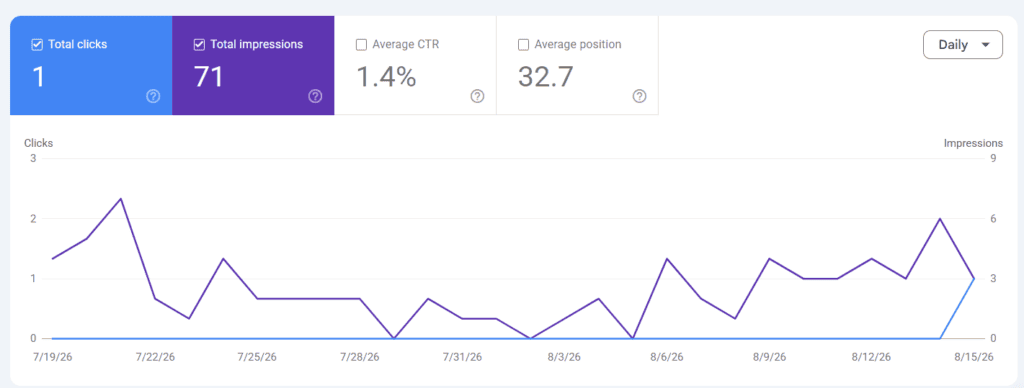
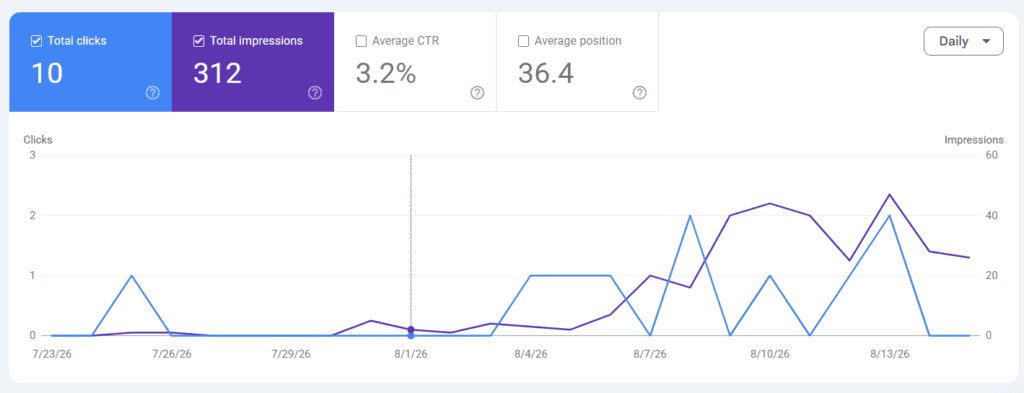
There’s something strangely satisfying about seeing your first impressions appear.
Maybe you publish an article and get 8 impressions.
Then 30.
Then 200.
The numbers may still be tiny, but you’re starting to see evidence that Google has discovered your content.
And that’s when SEO becomes much more real. You’re no longer reading about search traffic. You’re watching your own site begin to participate in it.
My take: Set it up as early as possible.
6. Google Analytics 4 — Understand What Happens After Visitors Arrive
Search Console helps answer: How are people finding me?
Google Analytics helps answer: What happens after they get here?
That’s an important distinction.
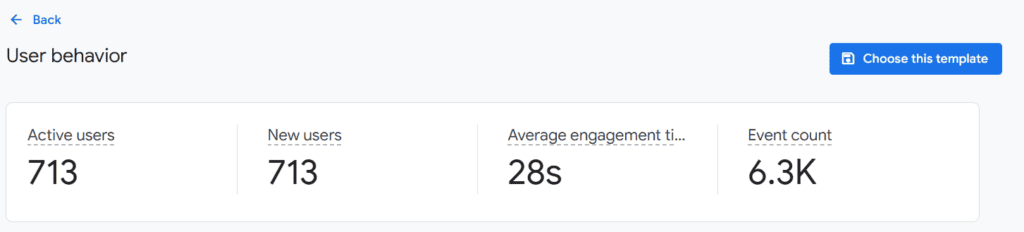
You can use GA4 to understand things like:
- traffic sources
- landing pages
- engagement
- referral traffic
- user journeys
- conversions
For affiliate marketing, don’t get too caught up in individual numbers.
Look for patterns.
Maybe one article gets 2,000 visitors but very few affiliate clicks.
Another gets 500 visitors but sends considerably more people to a product page.
Those articles probably need different strategies.
The second article may actually be more valuable to your business.
My take: Install it early, then resist the temptation to check it every few hours.
7. Microsoft Clarity — Watch How People Use Your Website
This is one of my favorite tools for adding some human context to analytics.
GA4 can tell you that people left a page.
Clarity can sometimes help you understand what happened before they left.
Microsoft Clarity offers features including session recordings and heatmaps, and the service remains free.
Imagine you’ve spent hours creating an affiliate comparison article. You carefully designed a comparison table. You added a recommendation. You placed a CTA near the top. And nobody clicks it.
Instead of guessing why, you can look at how visitors actually interact with the page.
Maybe they never scroll far enough. Maybe the button doesn’t look like a button. Maybe your comparison table is too complicated. Maybe the answer they’re looking for is buried in paragraph eight. This is the kind of information that traffic numbers alone can’t give you.
And sometimes it’s a little humbling. That’s useful too.
My take: Free and genuinely useful once your site has enough visitors for the behavior data to mean something.
8. ThirstyAffiliates — Keep Your Affiliate Links Under Control
Three affiliate links are easy.
Thirty are manageable.
A few hundred spread across a growing website?
That’s when things get interesting.
ThirstyAffiliates is designed to help WordPress site owners organize and manage affiliate links.
This matters because affiliate programs change.
Products change.
URLs change.
Programs close.
And occasionally you discover that you’ve pasted the same affiliate URL into 27 articles.
A centralized system can make those changes much easier to manage.
But again, I wouldn’t install a link-management plugin simply because someone says:
“Every serious affiliate marketer needs one.”
If you have ten affiliate links, manual management is perfectly reasonable.
When managing links starts becoming annoying, that’s your signal.
My take: A growing-site tool rather than a day-one tool.
9. Kit — Don’t Let Every Visitor Disappear Forever
There’s a frustrating thing about relying entirely on search traffic.
Someone finds your article. They read it. Maybe they click an affiliate link. Then they close the browser. And you may never see them again.
That’s one reason I like the idea of building an email list.
Kit is a creator-focused email platform that provides tools for newsletters, forms, automations, and subscriber management.
You might offer readers something useful in exchange for an email address:
- a checklist
- a printable
- a budgeting template
- a resource guide
- a short email course
Then you have a way to stay connected.
You don’t need a complicated 17-email funnel.
In the beginning, a useful free resource and a simple newsletter can be enough.
My take: Add it when you have something genuinely useful to offer and enough visitors to make list-building worthwhile.
10. Canva — Make Useful Content Look Good
I use Canva because it makes design much easier than it used to be.
Not every article needs a beautiful graphic.
But sometimes a good visual makes information easier to understand.
I use Canva for things like:
- blog graphics
- Pinterest images
- comparison charts
- lead magnets
- worksheets
- PDFs
- social media visuals
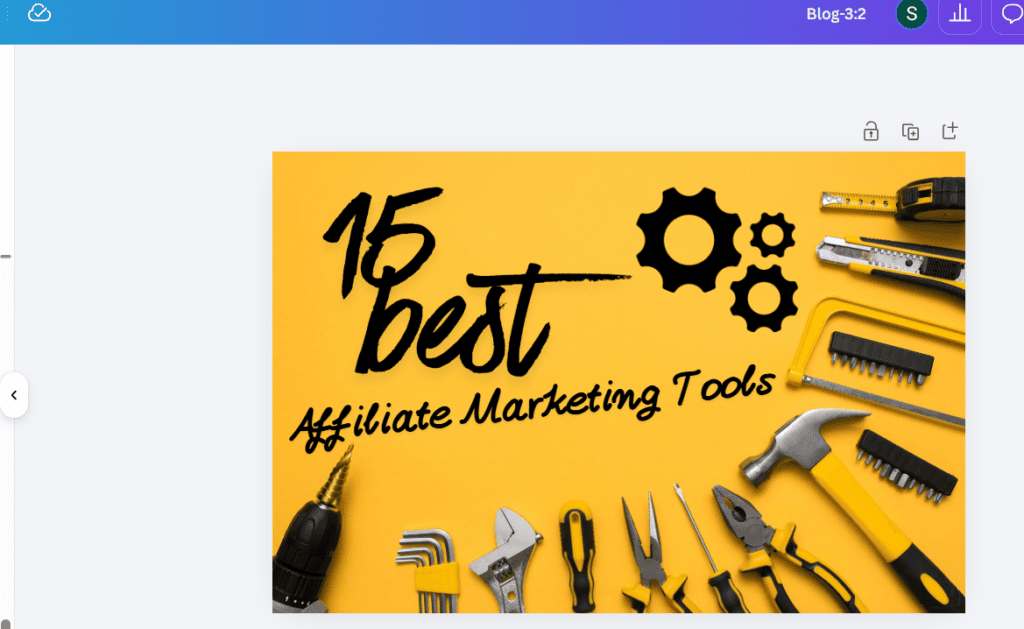
The biggest benefit, in my opinion, is not that Canva magically makes everyone a designer.
It’s that it lowers the barrier.
You can create something clean and professional without spending hours learning complicated design software.
And for a content business, that’s often all you need.
My take: One of the easiest tools to justify from the beginning because you can use it for so many different things.
11. Google Workspace — Sometimes Boring Is Good
Google Docs.
Google Sheets.
Google Drive.
Not particularly exciting. But extremely useful.
A surprising amount of affiliate business management can be handled with simple documents and spreadsheets.
For example, you can keep a content sheet with:
| Article | Keyword | Status | URL | Affiliate Links | Last Updated |
|---|
You can use Docs for research and outlines.
Drive can hold images, screenshots, content briefs, and downloadable resources.
You don’t need an elaborate project management system just because someone on YouTube has one.
Sometimes a spreadsheet is enough.
My take: Start with simple tools and upgrade only when simple tools stop working.
12. Awin, Impact, and CJ Affiliate — Find Affiliate Programs
Eventually, you’ll need to find brands and products that fit your audience.
That’s where affiliate networks can help.
Three worth knowing are:
Awin
A large international network with a broad range of advertisers.
Impact
Particularly relevant for SaaS, digital products, and many modern brands.
CJ Affiliate
One of the established names in the affiliate network space, with a wide range of advertisers.
But I’m not going to turn this section into another affiliate-network comparison.
I’ve already written a more detailed guide:
How to Choose the Right Platform for Your Affiliate Marketing Journey
If you’re at the stage of deciding which network makes sense for you, that’s the article I’d read next.
And don’t feel like you need to join every network.
The goal isn’t to collect affiliate accounts.
It’s to find products your audience actually needs.
My take: Choose networks based on your niche, audience, and the programs available—not the size of the network’s logo.
13. Hostinger — Your Website Needs Somewhere to Live
This one is a little different from the other tools on the list.
You can debate whether you need Semrush.
You can debate whether you need Surfer.
You can debate whether you need an affiliate link manager.
But if you’re building a self-hosted WordPress affiliate website, you need hosting.
I use Hostinger, which is why I’m comfortable including it here as a recommendation based on actual use rather than simply comparing hosting companies on paper.
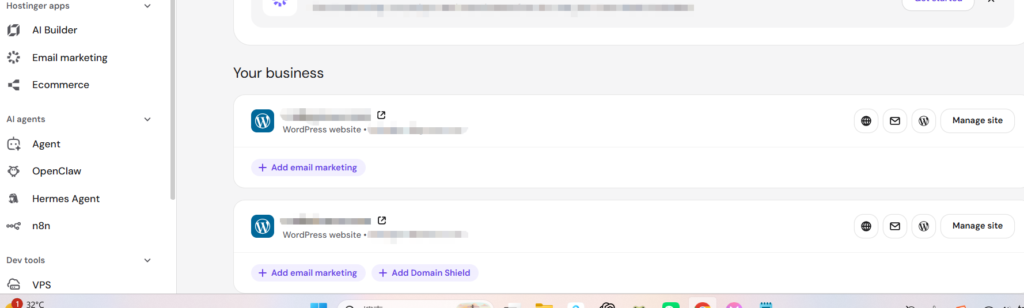
For a beginner affiliate site, I’d focus on a few simple things:
- reliable hosting
- an easy WordPress setup
- enough performance for a growing content site
- manageable costs
- support when you need it
You don’t need enterprise infrastructure for your first 20 articles.
You need a website that works.
A small bonus for my readers
I also have a Hostinger referral offer that gives new customers up to 20% off when they purchase through my referral link.
Click here to register as a hostinger and get a 20% discount.
Affiliate disclosure: If you purchase through my link, I may receive a commission at no additional cost to you. One important distinction: Hostinger has separate affiliate and referral programs, with different terms. Its current referral-program terms say eligible referrals can receive up to a 20% discount, while the affiliate program has its own commission structure and eligibility requirements.
For its affiliate program, Hostinger’s current agreement says eligible products can earn commissions of up to 40%, while its FAQ describes the program as starting at 40% revenue share. The affiliate tracking cookie is currently up to 30 days.
Because these terms can change, I’d always check Hostinger’s current offer before purchasing.
My take: If you’re building a WordPress affiliate website, hosting is one of the few things you genuinely need from the beginning.
14. Wordfence — The Boring Tool You’ll Be Glad You Have
Nobody starts an affiliate website thinking:
“I can’t wait to configure my security plugin.”
But website security matters.
Wordfence provides WordPress security features such as firewall protection, malware scanning, login security, and two-factor authentication.
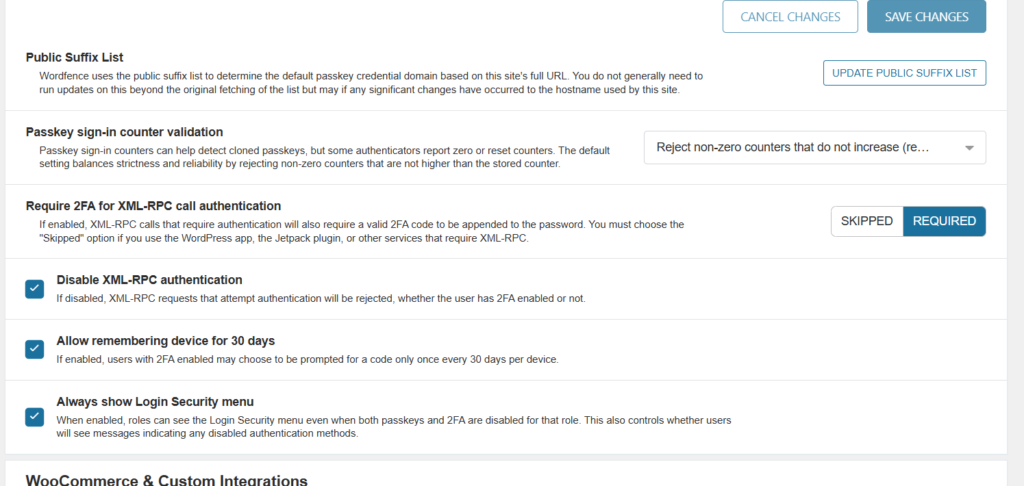
It’s one of those tools that should hopefully become boring.
You install it. Configure it. Keep it updated. Then go back to creating content.
Because the worst time to start thinking seriously about website security is after something has already gone wrong.
My take: Not exciting. Still worth taking seriously.
15. Journey by Mediavine — A More Accessible Way Into Display Advertising
This is the section I would have written very differently a year or two ago.
If you’ve been reading older articles about display advertising, you may have seen Journey, Mediavine, and Raptive listed as three separate choices.
That’s not really the clearest way to think about the current Mediavine ecosystem.
Journey is Mediavine’s lower-threshold entry point for growing publishers.
Mediavine’s current program information says Journey starts at 1,000 monthly sessions, while its main Mediavine program currently uses an annual ad-revenue qualification of at least $5,000.
That’s a meaningful change for smaller websites.
You don’t necessarily have to wait until you’ve built a huge site before exploring professional ad management.
That doesn’t mean you should rush to put ads on a brand-new website.
If you have 15 articles and very little traffic, I’d still prioritize:
content → search traffic → audience → monetization
rather than:
ads → ads → more ads
But once your traffic starts reaching the level where advertising makes sense, Journey is worth knowing about.
And as your publishing business grows, Mediavine’s broader programs can become relevant too.
My take: A monetization option to think about later—not something you need on day one.
Do You Actually Need All These Affiliate Marketing Tools?
No.
And honestly, I’m glad you made it this far, because this may be the most useful part of the whole article.
You don’t need 15 tools.
You don’t even need 10.
You need the tools that solve the problems you actually have.
That’s an important distinction.
Because it’s incredibly easy to confuse building your business with organizing the tools you might someday use to build your business.
I’ve done enough of this to know how tempting it is.
Researching tools feels productive.
Comparing features feels productive.
Watching tutorials feels productive.
But none of those things replace publishing a useful article.
So here’s how I’d approach it.
If You’re Just Starting
Keep it simple.
Your basic stack:
Hostinger + WordPress
Your website.
Rank Math
Basic on-page SEO.
Google Search Console
Search performance.
Google Analytics
Traffic and behavior.
Canva
Visual content.
That’s enough.
Really.
You don’t need to spend hundreds of dollars a month on software before you’ve published enough content to learn what your audience wants.
If You’re Growing
Now the situation changes. You’ve published consistently. You’re getting impressions. Some articles are beginning to rank. You’re starting to see patterns.
This is when I’d consider adding:
- Semrush
- Surfer
- Microsoft Clarity
- Link Whisper
- ThirstyAffiliates
Now the tools have a job to do. Semrush helps you research. Surfer helps improve content. Clarity helps you understand visitors. Link Whisper helps manage your growing content network. ThirstyAffiliates helps manage your growing collection of affiliate links.
That’s a much better reason to pay for software.
If You’re Building a Real Media Business
Eventually, the goal isn’t simply to get traffic. It’s to build an audience and multiple revenue streams.
That’s when I’d look at:
- Kit
- more affiliate networks
- more advanced affiliate tracking
- display advertising
- additional SEO and content tools
At this point, your tool stack should reflect the business you’ve actually built.
Not the business you hope to build someday.
My Recommended Affiliate Marketing Stack
If you asked me to forget the giant list and simply tell you what I’d personally prioritize, here’s how I’d break it down.
Stage 1: Build
Hostinger
→ Get the website online.
WordPress + Rank Math
→ Publish and handle basic SEO.
Google Search Console
→ See whether Google is discovering your content.
Google Analytics
→ Understand your traffic.
Canva
→ Create clean visuals and downloadable resources.
That’s enough to start.
Stage 2: Grow
Once you have a real library of content:
Semrush
→ Find better opportunities and understand competitors.
Surfer
→ Improve content and explore AI-search visibility.
Microsoft Clarity
→ Watch what real visitors do.
Link Whisper
→ Strengthen internal linking as the site grows.
ThirstyAffiliates
→ Keep affiliate links organized.
This is the stage where I think tools can start making a noticeable difference in productivity.
Stage 3: Monetize & Scale
Once traffic and audience become meaningful:
Kit
→ Build an email relationship with readers.
Awin / Impact / CJ
→ Expand your affiliate opportunities.
Journey by Mediavine
→ Explore display advertising once your traffic is sufficient.
And only then would I start looking seriously at more specialized tools.
The Biggest Mistake You Can Make With Affiliate Marketing Tools
Here’s what I’d watch out for.
Don’t let tools become procrastination.
It’s very easy to spend three hours researching the “best keyword research tool.”
It’s much harder to sit down and write the article.
It’s easier to compare five email platforms than to create the free resource you’re going to give your subscribers.
It’s easier to redesign your dashboard than to publish another useful piece of content.
I’ve caught myself falling into this kind of thinking too.
The uncomfortable truth is that tools often feel like progress.
But they’re not always progress.
So whenever you’re tempted to add another subscription, ask yourself:
What specific problem am I trying to solve?
If you can’t answer that clearly, you probably don’t need the tool yet.
Final Thoughts
You don’t need the most sophisticated affiliate marketing stack.
You need a stack that matches where you are.
When you’re starting, that might be nothing more than:
WordPress + hosting + Rank Math + Google Search Console + Analytics + Canva.
As your site grows, you may add:
Semrush + Surfer + Clarity + Link Whisper + ThirstyAffiliates.
And when you have a real audience, you can start thinking seriously about:
email + broader affiliate programs + display advertising + more advanced analytics.
The order matters.
Your business should create the need for the tool—not the other way around.
So don’t worry about having the perfect stack.
Publish the article. Learn what readers want. Watch what happens. Then buy the tool that solves the next problem.
That’s probably a much better way to build an affiliate business than trying to own every tool on the internet.
Affiliate Disclosure
Some links in this article may be affiliate or referral links. If you purchase a product or service through one of these links, I may earn a commission or referral reward at no additional cost to you.
I don’t include a tool simply because it has an affiliate program. Some tools mentioned in this article may have no affiliate relationship with me at all.
My goal is to share tools that I believe can genuinely be useful for people building an affiliate business.
Related Reading
If you’re building an affiliate business, these guides may help next:
- What Is Affiliate Marketing? A Beginner’s Guide to Building Passive Income Online
- How to Choose the Right Platform for Your Affiliate Marketing Journey
- How to Choose Affiliate Products That Actually Sell
- How to Track Amazon Affiliate Earnings Across Multiple Websites
- Does Ahrefs Have an Affiliate Program in 2026?
- Surfer SEO Affiliate Program: How It Works, Commission Rates & Who It’s For
A Note From SmileGrows
Is this financial advice?
No. The content on SmileGrows is intended for general educational and informational purposes only. It does not constitute financial, investment, tax, legal, or other professional advice.
How accurate is the information?
I do my best to research and verify the information I share, but mistakes, outdated information, missing context, or incorrect interpretations can happen. When discussing financial figures or company developments, please refer to the original sources for the most current information.
What if I find an error?
Please let me know! I genuinely welcome corrections, suggestions, and thoughtful feedback. If you spot an error, outdated information, or an incorrect attribution, I’d be happy to review it and make corrections when appropriate.
Can I make financial decisions based on these articles?
Nothing on SmileGrows constitutes financial, investment, tax, legal, or other professional advice. Please do your own research and consult a qualified professional when making financial decisions. When discussing companies, financial figures, or other factual claims, please refer to the original sources for the most authoritative and up-to-date information.