Hostinger Review for Beginners: Is It Worth It for Starting a Blog?
If you’re looking for a Hostinger review for beginners, you’re probably trying to answer a very practical question: Is Hostinger actually a good choice for starting a blog, or am I just seeing another affiliate recommendation?
That’s a fair question.
I use Hostinger for SmileGrows, so I have a reason to recommend it. But that doesn’t mean I think it’s automatically the right hosting company for everyone.
In this review, I’ll show you why I chose it, what I like about using it, what I think beginners should watch out for, and who I believe Hostinger is — and isn’t — suitable for.
Disclosure: This article contains affiliate links. If you purchase through one of my links, I may earn a commission at no additional cost to you. I only recommend products that I use, research, or believe are relevant to the readers of SmileGrows.
If you’re already comparing hosting options and want to try Hostinger, new customers can get 20% off eligible hosting purchases through my referral link. Check Hostinger and get 20% off
[How to Start a Blog in 2026: A Step-by-Step Guide for Beginners →]

Why I Chose Hostinger
When I was building SmileGrows, I didn’t want hosting to become the most complicated part of the project.
I wanted something that would allow me to:
- Host a WordPress website
- Manage the site without advanced technical knowledge
- Keep the initial cost reasonable
- Have access to support when needed
- Scale the website as it grows
That’s the basic reason Hostinger ended up being my choice. Not because I believe there is one universally “best” hosting company. But because it fit what I was trying to build.
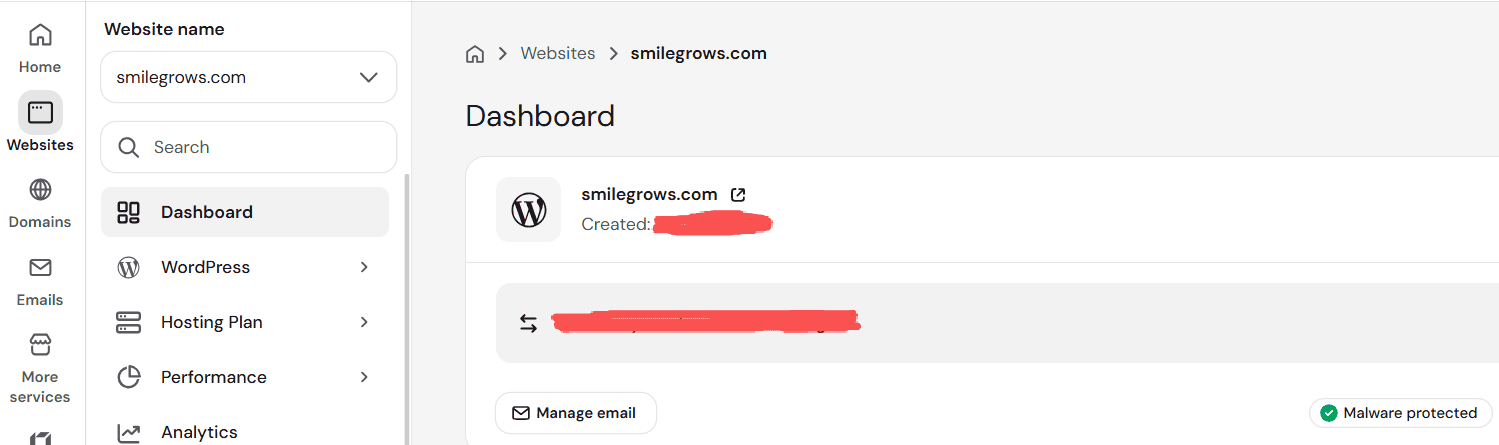
The Hostinger dashboard I use while managing SmileGrows.
What I Like About Hostinger
1. Beginner-Friendly Setup
Beginner-friendly setup. One thing I appreciate is that the setup process doesn’t require you to be a server expert. For someone trying to start a blog rather than become a hosting engineer, that’s genuinely useful.
The less time I spend figuring out infrastructure, the more time I have for content.
That matters to me.
2. WordPress Support
SmileGrows is built with WordPress, so compatibility with WordPress is important to me. If your main goal is to build a content website, you’ll probably spend much more time inside WordPress than inside your hosting dashboard.
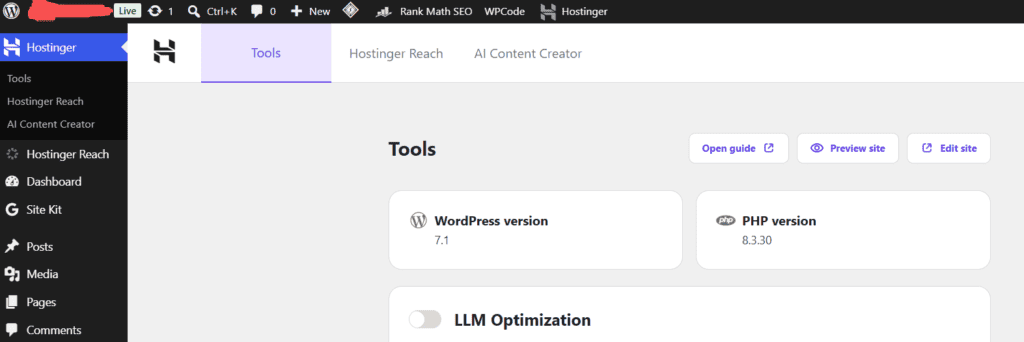
The hosting environment needs to make that process reasonably straightforward.
3. The Dashboard
The hosting dashboard is another part beginners should consider.
You don’t want to constantly feel like you’re navigating a control panel designed only for developers. I find Hostinger’s interface relatively approachable for the kind of website I’m building.
4. Pricing Can Be Attractive for Beginners
One reason Hostinger gets attention from new website owners is its pricing.
But there’s an important distinction: Introductory pricing is not the same as renewal pricing.
This is something I recommend checking before purchasing any hosting plan, not just Hostinger. Look at the full terms of the plan you’re considering. Don’t buy something simply because the first number you see looks inexpensive.
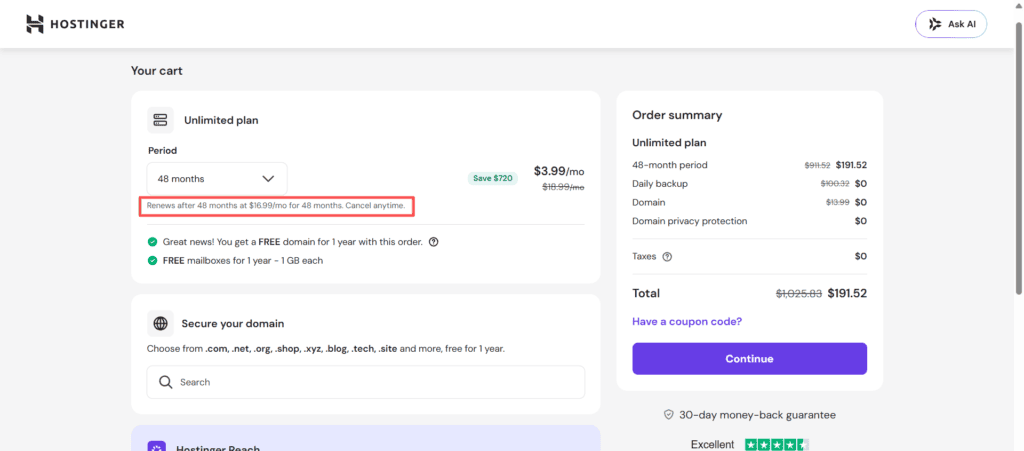
Because pricing and promotions change, I recommend checking the current plan details directly before making a purchase.
If you’re a new customer, my Hostinger referral link currently offers 20% off eligible hosting purchases. View Hostinger’s current plans and get 20% off
What I Don’t Like
An honest review shouldn’t only list advantages.
There are a few things I think beginners should consider carefully.
1. Renewal Pricing
As mentioned above, you should distinguish between the initial promotional price and the price you’ll pay when the introductory period ends.
This isn’t unique to Hostinger. It’s simply something you should understand before purchasing web hosting.
2. Different Plans Have Different Limits
Not every hosting plan provides the same resources or features.
If you’re building one small blog, your needs will be different from someone managing multiple websites with high traffic.
Don’t automatically buy the biggest plan. But don’t choose the smallest plan without checking its limitations either.
3. Advanced Users May Want More Control
If you’re an experienced developer or you’re building a highly specialized application, your priorities may be different.
You may care more about:
- Server configuration
- Advanced infrastructure
- Specialized hosting environments
- Custom technical controls
That’s not really the use case I’m evaluating here.
I’m evaluating Hostinger from the perspective of:
Someone who wants to build a content-focused website without making hosting unnecessarily complicated.
Is Hostinger Good for Blogging?
For the kind of blog I’m building with SmileGrows — WordPress, content, SEO, affiliate marketing, and eventually digital products, I think Hostinger makes sense.
If you’re building a WordPress blog and want a relatively straightforward setup, this is the point where I’d consider Hostinger. New customers can get 20% off eligible hosting purchases through my referral link. Try Hostinger for your new blog and get 20% off
The hosting is infrastructure. The real business is everything built on top of it. And that’s an important distinction.
You don’t need to spend weeks comparing hosting companies if you’re starting a small blog.
You need a reliable enough foundation and then you need to get back to building.
Who Is Hostinger Good For?
I’d consider Hostinger if you’re:
- Starting your first blog
- Building a small business website
- Using WordPress
- Starting a side project
- Creating a personal website
- Testing an online business idea
- Looking for a relatively beginner-friendly hosting environment
Who Might Want Something Else?
I’d look elsewhere if:
- You have highly specialized infrastructure requirements
- You’re an advanced developer who wants extensive server control
- Your project has unusual technical requirements
- You need enterprise-level hosting architecture
In those cases, “beginner-friendly” may not be your most important criterion.
How Hostinger Fits Into My Blogging Setup
Here’s how I think about the full stack: domain, then Hostinger, then WordPress, then content, then SEO, then traffic, then audience, then monetization.
Hostinger is only one part of that system.
And honestly, it’s not the part I’m spending most of my time thinking about. Once the website is running, my attention goes back to:
What should I publish?
Who am I trying to help?
How can I make this article genuinely useful?
Why would someone come back?
Those questions matter far more to a blog’s long-term success than the hosting company behind it.
What I Would Check Before Buying
Before you purchase any hosting plan, I’d recommend checking these things:
Pricing
Look at both the introductory and renewal price.
Contract Length
Understand whether the advertised price assumes a longer billing period.
Website Limits
Check how many websites the plan supports if you may build more than one.
Storage
Make sure the plan is appropriate for your expected website size.
Backups
Understand what’s included and how frequently backups are created.
Support
Check what support channels are available.
WordPress Features
Look at the specific WordPress-related features included with the plan you’re considering.
This information can change, so I recommend checking Hostinger’s current plan details before purchasing.
My Experience So Far
I don’t want to pretend that using Hostinger means everything about running a website suddenly becomes easy. It doesn’t.
You will still encounter:
- WordPress settings
- Plugins
- SEO problems
- Technical errors
- Cookie and privacy requirements
- Design decisions
- Site speed questions
- Search Console issues
- Content problems
Hosting solves one part of the puzzle. It doesn’t build the business for you.
That’s actually a useful distinction for beginners. If someone tells you that choosing the “right hosting” is the secret to making money online, be skeptical. Your hosting doesn’t create your audience. Your work does.
So, Is Hostinger Worth It?
For me, yes. I’m using it for SmileGrows because it fits the type of website I’m building and the level of technical complexity I currently need.
But I wouldn’t say: “Everyone should use Hostinger.”
I’d say: If you’re a beginner building a WordPress blog or small website and you value a relatively straightforward setup, Hostinger is an option worth considering. Check Hostinger and get 20% off
That’s a much more useful recommendation.
And if you’re still deciding whether starting a blog makes financial sense, read:
[How Much Does It Cost to Start a Blog in 2026?]
If you’re ready to understand the entire process of building a blog from scratch, start here:
[How to Start a Blog in 2026: A Step-by-Step Guide for Beginners →]
One Last Thing
It’s easy to spend too much time choosing tools when you’re just getting started, I’ve done it too. You compare hosting, then themes, then plugins, then SEO tools, then design software. At some point you have to stop preparing and actually build.
The website will never be “finished.” There will always be another plugin, another design idea, another optimization. But none of that matters if you aren’t publishing useful content.
So if you’re considering Hostinger for your first blog, make the hosting decision carefully, but don’t let it become the reason you never start.
Build the website.
Publish the first article.
Then learn from what happens next.